


PulsePoint Respond
4.611.03K Reviews
App Specs
- Version
- v26.7.6707
- Updated On
- License
- Free
- Downloads
- 1,000,000+
- Developer
- PulsePoint Foundation
- Categories
- Medical
- Platform
- Android, iOS
Screenshots
 Analysis by AppCompare
If you're as fascinated by technology's ability to connect us as I am, then you're in for a treat with PulsePoint Respond. This app is like having a digital superhero in your pocket, designed to empower everyday citizens to assist in emergencies. As someone who appreciates the blend of tech and community service, I couldn't wait to dive into this app.
What to expect before you begin
PulsePoint Respond is a free medical app from PulsePoint Foundation, intended for people who can help when a cardiac emergency happens nearby. It has a 4.6 average from around 34,000 ratings, and more than a million installs. Those figures suggest plenty of interest, but the value for you depends on whether your local emergency services are connected and whether you are ready to respond. It is rated for everyone, though the situations it deals with can be serious.
I would think of it as a way to receive a prompt, not as a replacement for calling emergency services or following a dispatcher’s directions. It is most useful if you already know CPR, or are willing to learn, and can remain calm enough to act. If you are looking only for general first-aid lessons, a dedicated training resource is a better fit; an incident-alert app is not a substitute for practice.
The app’s purpose also makes it different from the usual medical apps. Many focus on personal health records, symptom information, or appointment management. PulsePoint Respond is about a possible community response to a nearby emergency. That focus is compelling, but it means usefulness can vary with local coverage and with where you are when an alert arrives.
What is PulsePoint Respond?
Imagine being notified of a nearby emergency where you could genuinely make a difference. PulsePoint Respond is an app that alerts users to nearby cardiac arrest situations, enabling them to respond with CPR before professional help arrives. It's a brilliant concept that leverages the power of community involvement to potentially save lives.
Getting Started with PulsePoint Respond
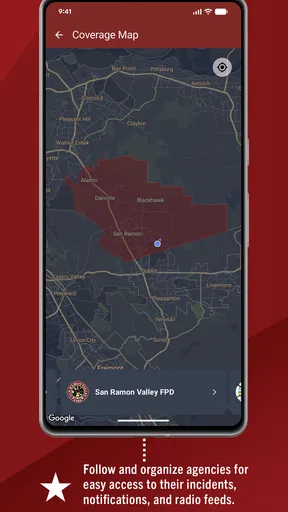
Setting up the app is a breeze. Once you download it from the app store, you’ll be asked to enable location services. This might feel a bit intrusive, but it’s essential for the app to function effectively. You’ll then select your local emergency services agency, and just like that, you’re ready to go.
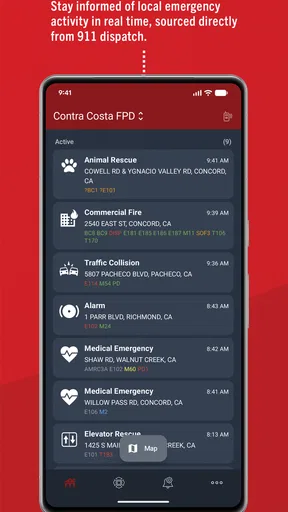
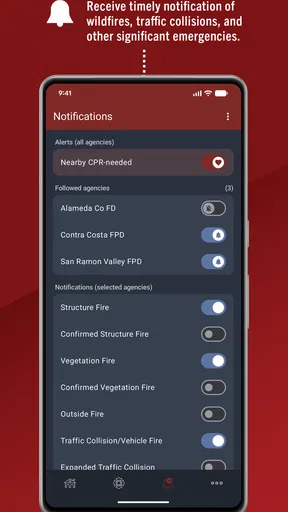
I was impressed by how intuitive the interface is. The home screen provides a map and a list of recent incidents, and you can tailor notifications to your preferences. If you’re like me and want to be a part of something bigger, this app makes it easy to stay informed and ready to help.
Worth Reading Before You Choose

EA SPORTS FC Mobile 26 Is a Bigger Football Game, but It Takes Time

Flipboard Shows What News Apps Must Do Beyond the Feed

Switching to Android Auto Means Rethinking Your Driving Routine

Google Calendar Makes a Crowded Week Easier to Manage

Ludo King Makes the Most of the Minutes Between Plans

Baby Panda World Brings Quick Play to Modern Phones, but Its Game Library Feels Busy
Making your first setup useful
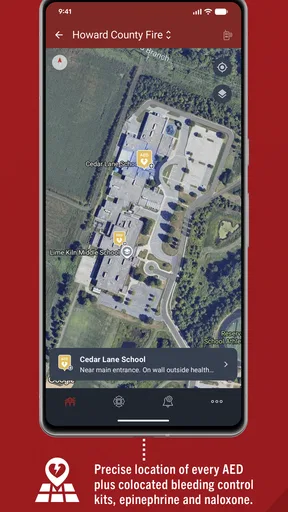
For a first-time user, the important step is not simply installing the app; it is checking that you have selected the relevant local agency and chosen notification settings you can live with. Give the map a look before you need it. Seeing how incident information and AED locations are presented in your own area can make the interface less unfamiliar if an alert ever arrives while you are out.
Location access is a practical trade-off: the app needs to relate alerts to where you are, but you should make a deliberate choice about whether its role justifies that access for you. If you regularly travel between home, work, and other familiar places, consider how your selected settings fit those routines. Do not assume that installing it automatically means every nearby emergency will produce an alert; local participation and the circumstances of an incident matter.
Features That Stand Out
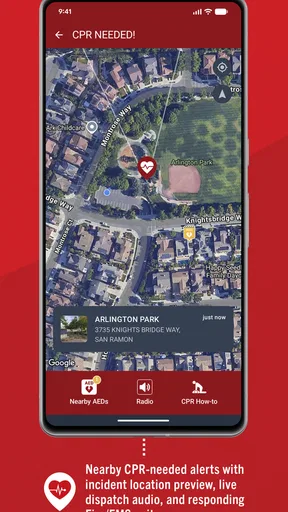
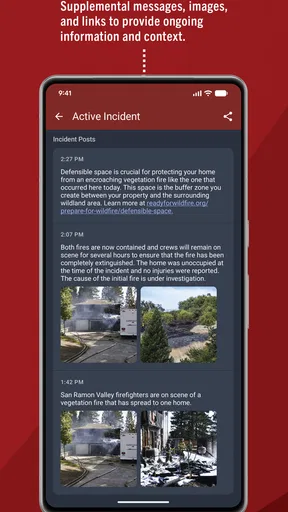
One of my favorite features is the real-time alerts. When an emergency occurs nearby, the app notifies you instantly. It even provides the location and type of emergency, so you know exactly what to expect. This immediacy can be crucial in life-saving situations.
The app also integrates with AED (Automated External Defibrillator) locations, displaying them on the map. This can be a game-changer, especially in time-sensitive cardiac arrest cases. Knowing where the nearest AED is could make all the difference.
Additionally, PulsePoint Respond offers a social media-style feed where you can see a list of recent incidents and community engagement. It's a nice touch that keeps you connected to local happenings, fostering a sense of community involvement.
Turning an alert into a sensible first action
Imagine you are walking through a public place and a nearby alert arrives. Rather than rushing blindly toward the map marker, first read the incident details and decide whether you are in a position to help safely. If you know CPR, respond only if the location and situation make sense to you; otherwise, do not treat the notification as an instruction to enter an unsafe area. Emergency professionals remain the priority, and you should follow official directions at the scene.
A useful, less obvious habit is to look at AED markers during ordinary moments, not only when an emergency is underway. Notice where a device appears in relation to places you visit, while remembering that a map marker is a prompt to orient yourself, not a guarantee about access or availability. That small bit of familiarity may make the map easier to interpret under pressure.
My Experience Using the App
I was initially skeptical about how often I’d actually use the app, but it turns out the notifications are not as frequent as I feared. When they do appear, it’s a stark reminder of the importance of staying alert and prepared.
One memorable instance was when I received a notification while at a local park. The app guided me to a nearby location with clear instructions on what to do. Thankfully, paramedics arrived shortly after, but the adrenaline rush was a clear indication of how critical these first moments can be.
What can be confusing, and who should pass
The alert can feel more definitive than it is: it gives a location and incident type, but that does not make a phone notification a complete picture of what is happening on scene. Treat it as a chance to assess and help, not as permission to take risks or as a substitute for professional instructions. If you are unsure what to do, calling emergency services and following the dispatcher’s guidance is more appropriate than improvising based on a map.
This is also not the right choice for someone who wants a dependable personal safety alarm, a general health tracker, or a course that teaches CPR from scratch. Nor will it be equally useful to everyone in every place. If your area is not served by a participating agency, or you are unable or unwilling to respond to emergencies, the central alert function may not fit your needs. The feed and AED map can still be informative, but they do not change that basic limitation.
Compared with simply searching online for nearby AEDs, the map is more directly tied to the app’s emergency-response purpose. Compared with ordinary local news or community feeds, it is focused on incidents where immediate assistance may matter. That focus is its strength, but also why I would keep other tools for other needs rather than expect one app to cover every health or safety situation.
Why PulsePoint Respond Matters
This app isn’t just a tool; it’s a movement towards a more connected and responsive community. We often rely solely on emergency services, but PulsePoint Respond reminds us that we can all play a part in saving lives. The idea that I could potentially help someone in need is empowering and humbling at the same time.
Moreover, the app has the potential to educate the public about the importance of CPR and emergency response. With more people trained and willing to assist, the chances of survival for cardiac arrest victims can significantly increase. PulsePoint Respond not only alerts but also educates, making it a valuable tool in any community.
Keeping expectations realistic
The app’s current version is v26.4.6620 and it requires Android 9 or later. I would check compatibility before installing, especially on an older phone. Its free price removes a purchase decision, but it does not remove the practical questions: whether local emergency services are available in the app, whether you want location-based alerts, and whether you feel prepared to act.
One common concern is whether you need to be a medical professional. The app is aimed at community members who may be able to help, not only clinicians, but willingness alone is not the same as training. If you have not learned CPR, use the app as a reason to seek proper instruction rather than treating an alert as a lesson. If you are trained, keeping your knowledge current and thinking through how you would respond in familiar public places is a sensible next step.
Wrapping Up
In a world where technology often isolates us, it's refreshing to see an app that brings us closer to each other. Whether you're a trained medical professional or just someone with a willingness to help, PulsePoint Respond offers a unique opportunity to make a real difference.
If you’re looking for a way to contribute to your community and be a part of something bigger, I highly recommend giving this app a try. You never know when you might be in the right place at the right time to save a life.
My recommendation for a first-time user
I’d install it, choose the appropriate local agency, review the map and notification preferences, and then make an honest decision about what kind of response I could manage. If an alert comes, pause long enough to read it, prioritize safety, and follow emergency professionals’ directions. That approach gives the app a realistic role: it can help connect a prepared bystander with a moment when assistance may matter, without promising that every alert will lead to a successful intervention.
For me, the strongest reason to keep PulsePoint Respond is that it turns local awareness into a possible opportunity to help, while its chief limitation is that usefulness depends on circumstances beyond the app itself. If that balance suits you, it is a thoughtful community-minded addition to your phone. If you want personal medical advice or a guaranteed source of emergency support, choose a tool designed for that instead.
Pros
- Easy to navigate interface.
- Real-time emergency alerts.
- Community-driven support system.
- Life-saving CPR guidance.
- Customizable notification settings.
Cons
- Limited to participating regions.
- Requires constant GPS access.
- Battery consumption is high.
- Some alerts can be delayed.
- Dependent on community activity.
FAQs for PulsePoint Respond
What is PulsePoint Respond and how does it work?
PulsePoint Respond is a mobile app designed to empower everyday citizens to provide life-saving assistance to victims of sudden cardiac arrest. It alerts CPR-trained bystanders about nearby cardiac emergencies, enabling them to respond quickly and effectively until professional help arrives. The app also provides real-time notifications of local fire and emergency medical incidents.
Is PulsePoint Respond available for both Android and iOS devices?
Yes, PulsePoint Respond is available for download on both Android and iOS platforms. Users can easily find the app on the Google Play Store for Android devices and the Apple App Store for iOS devices, ensuring accessibility for a wide range of users.
Does PulsePoint Respond require a subscription or any in-app purchases?
PulsePoint Respond is completely free to download and use. There are no subscription fees or in-app purchases required to access its features. The app is supported by various public safety agencies and non-profit organizations, making it accessible to everyone interested in helping save lives.
How does PulsePoint Respond ensure user privacy and data security?
PulsePoint Respond takes user privacy and data security seriously. The app collects minimal personal information, primarily focusing on the user's location to alert them of nearby emergencies. All data is encrypted and securely stored, adhering to industry standards to protect user information from unauthorized access.
What are the main features of PulsePoint Respond?
PulsePoint Respond offers several key features, including real-time alerts for CPR-needed situations, integration with local emergency dispatch systems, and notifications about nearby fire and medical incidents. Additionally, users can receive updates about major emergencies in their community, helping them stay informed and ready to assist when necessary.


